If your machine needs an operator screen anyway, the cheapest controller is often the one you don't buy. If it doesn't, a small hardware PLC is hard to beat. Here is how to work out which case you're in, line by line, with your own quotes.
The short answer
A soft PLC is control logic that runs as software on an industrial PC or panel PC instead of on a dedicated PLC CPU. Whether it saves money depends almost entirely on one question: does the machine already need a PC-class HMI?
- Yes, it needs a real HMI (recipes, trends, reports, barcode scanners, a database): putting the logic on that same PC removes a whole controller, a second engineering tool and the PLC-to-HMI tag mapping. This is where soft PLCs usually win on cost.
- No, it's a small relay-replacement job with a few lamps and push-buttons: a micro PLC such as an S7-1200, Micro800 or FX5 is cheap, simple and very reliable. A PC will rarely beat it.
- Safety functions (E-stops, guard doors, light curtains) stay on a safety relay or a certified safety PLC in both cases. A soft PLC on a general-purpose PC is not a safety controller.
Every line item, side by side
Most "soft PLC vs hardware PLC" comparisons only compare the CPU price. That's the smallest part of the story. Here's the full bill of materials and engineering effort for a typical single machine with an operator panel:
| Cost item | Hardware PLC + HMI panel | HMI with embedded soft PLC |
|---|---|---|
| Controller CPU | PLC CPU (plus power supply / rack on larger families) | None — runs on the HMI PC |
| Operator screen | HMI panel | Industrial panel PC (usually a bigger spec than a basic HMI panel) |
| I/O | Local or remote I/O | Remote I/O over a fieldbus (Modbus RTU/TCP, EtherNet/IP…) |
| Engineering software | PLC programming licence and HMI design licence | One tool |
| Runtime licences | HMI runtime (sometimes bundled with the panel) | One runtime licence per device |
| PLC ↔ HMI integration | Tag export/import, communication setup, address mapping, testing | None — screens and logic share the same tags |
| Engineering hours | Two projects to build, version and keep in sync | One project file |
| Spares on the shelf | Spare CPU + spare panel | Spare panel PC |
| Commissioning laptop | Two tools installed, two online connections | One |
| Lifecycle | PLC families are typically supported for many years | PC hardware and OS change faster — plan for it |
Notice that I/O costs roughly the same either way — the sensors and actuators don't care what runs the logic. The savings (or losses) come from the controller, the software licences and, most of all, engineering time.
Work it out with your own quotes
List prices vary a lot by country, distributor and volume, so don't trust anyone else's numbers — including ours. Instead, put your own quotes into this simple comparison:
Option A (hardware PLC + HMI)
  = PLC CPU + PSU/rack
  + HMI panel
  + PLC software licence  (share across machines if you build many)
  + HMI software licence  (share across machines if you build many)
  + I/O
  + engineering hours × hourly rate   (PLC project + HMI project + tag mapping)

Option B (HMI with embedded soft PLC)
  = panel PC (with runtime licence)
  + remote I/O
  + engineering software licence  (shared)
  + engineering hours × hourly rate   (one project)
Two tips that change the result more than any list price:
- Count engineering hours honestly. Keeping a PLC project and an HMI project in sync — renaming tags, re-importing, fixing a broken address after a late change — is where most of the time goes on small machines.
- Multiply by your volume. An OEM building 20 identical machines a year pays the software licences once but pays for the CPU, the panel and the commissioning 20 times. The per-machine hardware difference matters far more than the one-off licences.
When a hardware PLC is the right choice
- Very small machines with little or no HMI. A micro PLC with a text display is cheaper than any panel PC.
- The customer's plant standard mandates a specific PLC brand so their maintenance team can support it.
- Hard real-time motion with tight synchronised axes — use a motion controller or a PLC built for it.
- Very long service lives in harsh cabinets where nobody will ever touch an operating system.
- Safety-rated control. Always on certified hardware.
When a soft PLC is the right choice
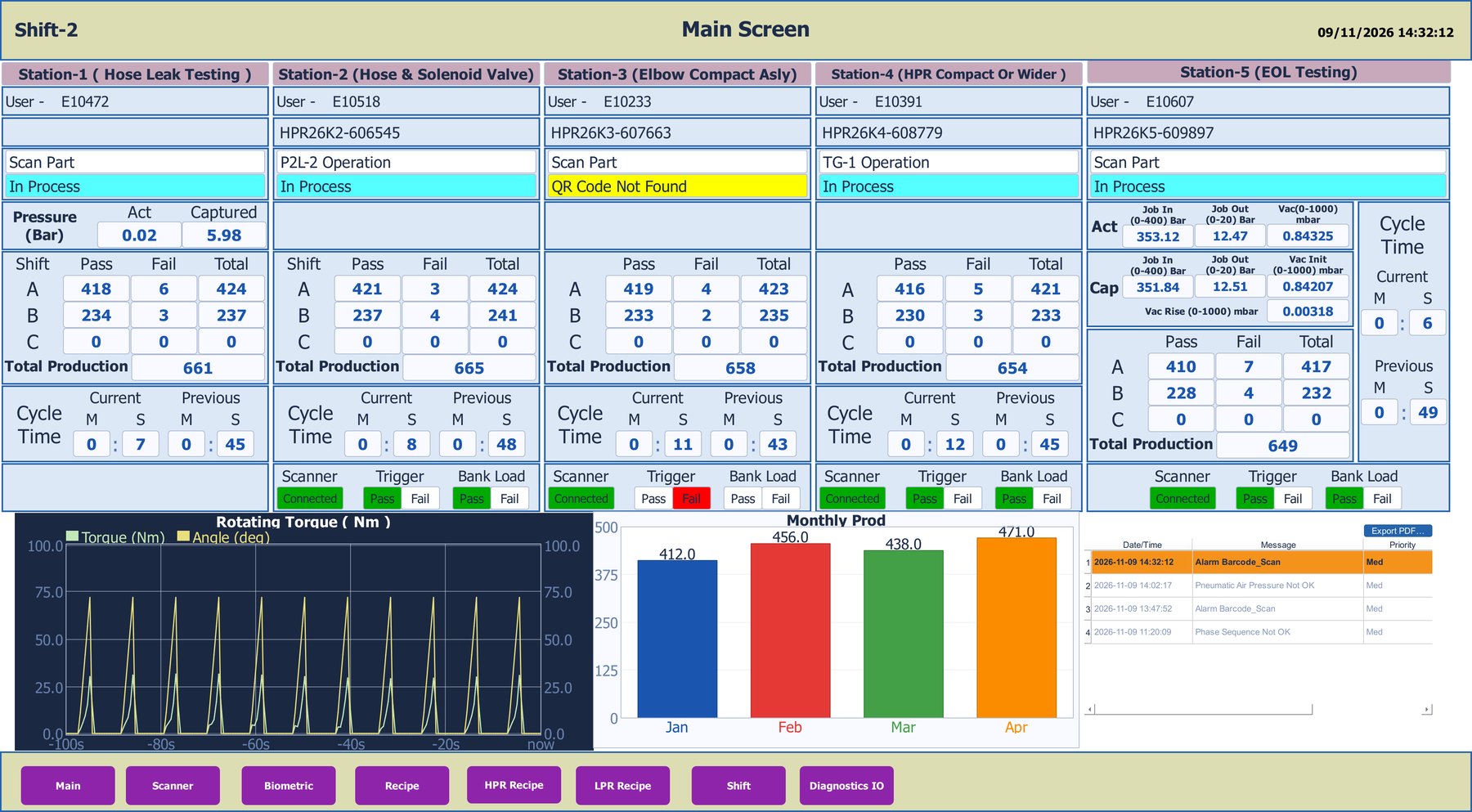
- The machine already needs an industrial PC for recipes, trends, SQL logging, PDF batch reports, barcode scanners or a camera.
- Multi-station lines where one big screen supervises everything.
- OEMs building many similar machines who want one project file per machine type.
- Prototypes and retrofits where you want to iterate on screens and logic together on a simulator before hardware arrives.
Hidden costs of a soft PLC — check these before you decide
- Scan-time monitoring. A PC runs other things. Make sure the runtime reports scan time and overruns so you can prove the logic keeps up.
- Operating system. Who applies updates? Can they be controlled? On Windows, factor in the OS licence; a Linux panel can avoid this.
- Hardware obsolescence. PC models change faster than PLC families. Keep the project portable so a new panel is a re-deploy, not a re-write.
- Lock-in. If a future customer insists on Siemens or Rockwell, can you get your logic out? Look for export to formats their tools actually import.
- Retentive data and power loss. Check how retentive variables are stored and what happens on an unclean shutdown.
How Logivyx approaches it
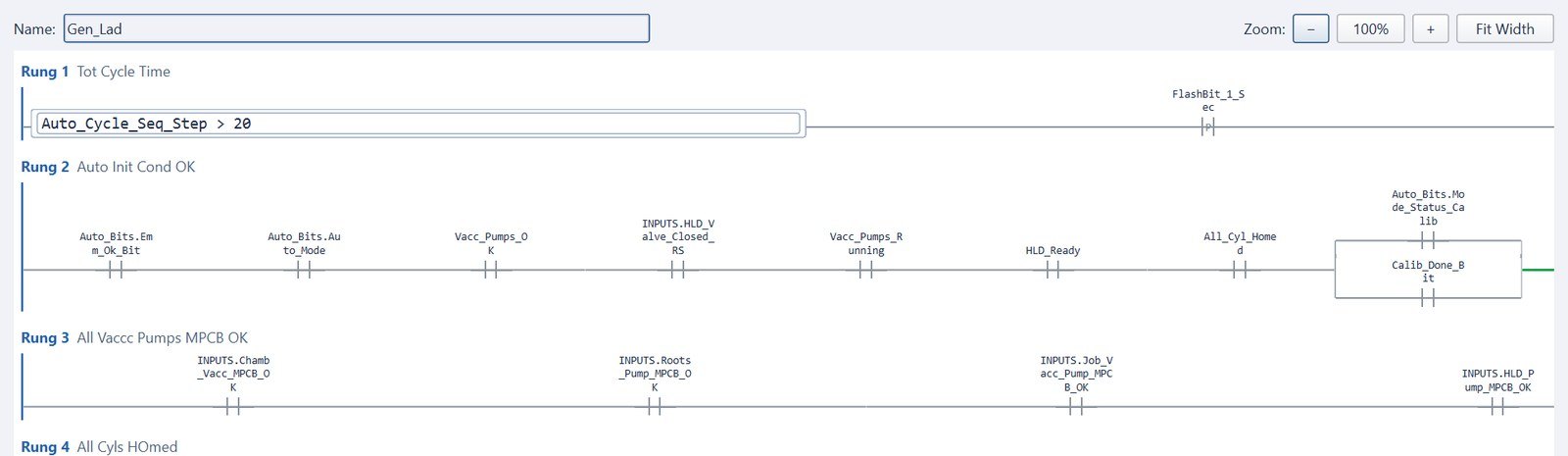
Logivyx is an HMI/SCADA designer with an embedded IEC 61131-3-style soft PLC. Screens, tags, Structured Text, Ladder and Sequences live in one .hmi project and run together on one Windows or Linux ARM64 panel — no separate PLC CPU.
- Cyclic scan with scan-time and overrun counters, retentive variables, and STARTUP/SHUTDOWN routines.
- Remote I/O over RS485 using our FieldIO modules with the built-in Modbus RTU driver, or any Modbus TCP, EtherNet/IP or OPC UA device.
- No lock-in: export logic to TIA Portal (SCL) or Studio 5000 (L5X) if a customer later demands a hardware PLC.
- Not ready to drop the PLC? Run Logivyx as a neutral HMI on top of your existing Siemens, Allen-Bradley or Mitsubishi controller and move logic across later.
See it in a real project: the helium leak testing machine runs 6 screens, 2 sequences and 2 ladder routines with zero PLCs.
Try it on your own project.
Design screens, write Ladder or Structured Text, and run both on the built-in simulator — or connect to your own Siemens, Allen-Bradley or Mitsubishi PLC. No separate PLC needed.